

It can be incredibly frustrating to hit “Print” on an urgent document only to have your machine spit out a stack of perfectly white sheets. If you’re currently staring at a tray of empty paper, you aren’t alone—this is one of the most common service calls we receive in Calgary.
At Cal-Imaging Specialists, we have over 35 years of experience helping local businesses solve their most stubborn IT headaches. Understanding why your printer is printing blank pages is the first step toward restoring your office workflow.
The Root Causes: Why Is My Printer Printing Blank Pages?
Whether you are using a high-volume laser copier or a small office inkjet, the reasons for “ghost printing” usually fall into one of four categories:
1. Consumable and Supply Issues
The most obvious culprit is often the simplest: you’ve run out of ink or toner.
-
Inkjet Printers: If your cartridges sit unused for too long, the ink can dry up and clog the microscopic nozzles in the printhead.
-
Laser Printers: Toner can sometimes “settle” or clump if the cartridge is old or exposed to moisture, preventing the powder from reaching the drum.
-
The “Tape” Oversight: If you just installed a new cartridge, double-check that the protective orange tape or plastic seal was fully removed.
2. Software and Driver Glitches
Your computer and printer need to speak the same language. If your printer drivers are outdated or corrupted—which often happens after a major Windows or macOS update—the instructions sent to the printer might get “lost in translation,” resulting in a blank page.
3. Incorrect Print Settings
Sometimes the “error” is actually a setting doing exactly what it was told to do.
-
Skip Blank Pages: Check if this setting is enabled in your print preferences; sometimes it accidentally flags content as “blank.”
-
Paper Size Mismatch: If the software thinks you are printing on “Legal” paper but the tray has “Letter,” the sensor might skip the page to avoid an error.
4. Hardware and Internal Failures
For laser printers and photocopiers, complex internal parts like the transfer roller or the drum unit might be failing. If the drum isn’t holding an electrical charge, the toner won’t stick to the paper, leaving you with a blank sheet despite having a full cartridge.
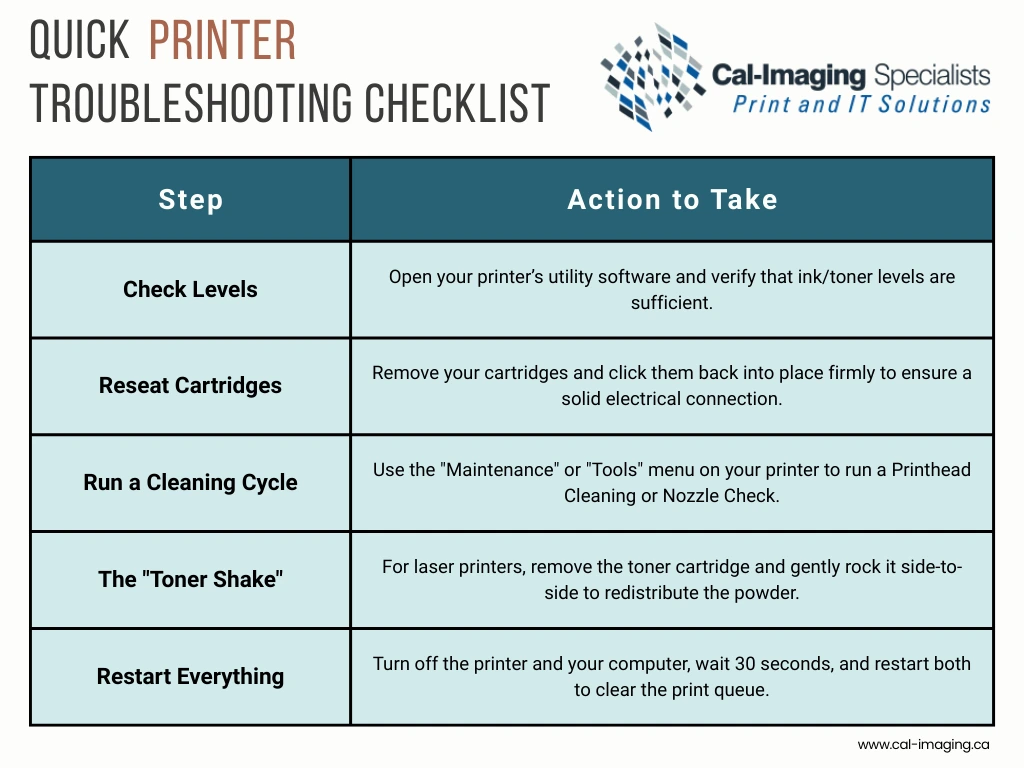
Quick Troubleshooting Checklist
Before calling for service, try these rapid fixes to see if you can get back to work immediately:
The Cal-Imaging Total Approach: Beyond the Quick Fix
If you’ve tried the steps above and you’re still asking why printer is printing blank pages, it may be time for professional intervention.
At Cal-Imaging, we don’t just fix the symptoms; we look at your entire print environment. As Calgary’s premier HP Authorized Service Centre, we service all major brands, including Canon, Xerox, Brother, Lexmark, and Ricoh.
-
Preventative Maintenance (PM): Our scheduled cleaning programs stop clogs and hardware failures before they happen.
-
Managed Print Services (MPS): We monitor your levels remotely and ship supplies before you run out, ensuring you never face an “empty cartridge” crisis again.
-
Expert Repairs: Our certified technicians have over 20 years of experience diagnosing complex hardware and network issues.
Stop the Frustration Today
Don’t let a “blank page” problem slow your business down. Whether it’s a simple driver update or a complex hardware repair, our Calgary-based team is ready to help.
Give our experienced technicians a call today or Contact Us to get your office back to peak productivity!