

It always seems to happen at the worst possible time. The accounting team is closing the month, the proposal is due to the client by 4 PM, and the office printer chooses that exact moment to start streaking, jamming, or simply refusing to turn on. Now the whole office is huddled around it, debating the same question every Calgary business owner faces eventually: do we fix this thing again, or is it finally time to replace it?
There’s a real cost to getting that decision wrong in either direction. Pour repair money into a printer that’s past its prime and you’ll spend more on service calls than a new unit would cost. Replace too soon and you’re throwing out years of useful life. After 45 years of servicing office printers across Calgary, we’ve developed a straightforward framework for making this decision — and we’ll walk you through it here.
The 50% Rule (And When to Ignore It)
The traditional rule of thumb in office equipment is the 50% rule: if a repair costs more than 50% of the price of a comparable new unit, replace. Simple, useful, and right most of the time. But like any rule of thumb, it misses important context.
Three factors push the threshold below 50%:
- The printer is more than 6 years old (well past typical service life for office MFPs)
- You’ve had two or more service calls in the past 12 months
- The next-generation models offer meaningful improvements in speed, security, or print cost-per-page
And three factors push the threshold above 50%:
- The unit is still under manufacturer warranty or extended service contract
- The repair is a single defined issue (one fuser, one roller, one part) rather than chronic problems
- The printer was purchased recently and has specialized features (large-format, secure release, industry-specific drivers) that would be expensive to replace
Common Printer Problems and What They Cost
Knowing typical repair costs helps you decide before the technician arrives:
Paper jams (frequent or chronic)
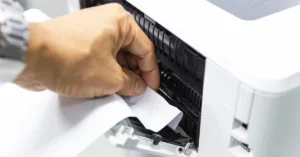
Usually $150–$400 to diagnose and repair. Single-cause jams (worn pickup roller, sensor issue) are almost always worth fixing. Chronic jamming across multiple causes is usually a sign of broader wear.
Streaking, banding, or print-quality issues

$200–$600 depending on the cause. Often a worn drum unit, fuser, or transfer belt. On a 4–5 year old MFP, these are usually worth fixing. On an 8+ year old unit, the bill stacks up fast.
Network or connectivity problems
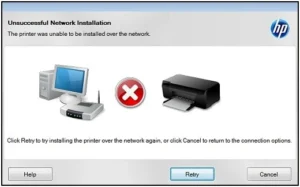
$100–$300 service call. Most often resolvable through firmware updates, driver reinstallation, or network configuration. Almost always worth fixing — these issues rarely recur after a proper fix.
Won’t power on or persistent error codes
$300–$800+ depending on the part. Logic board failures, power supply issues, and major sensor failures often indicate the unit is reaching end of useful life. Get a quote before committing.
Toner sensor or cartridge recognition issues
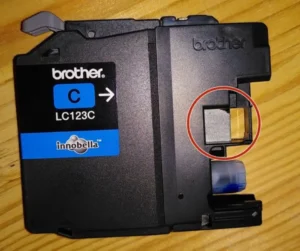
$150–$350. Usually a single sensor or contact replacement. Worth fixing unless it’s a repeat issue on an older unit.
Fuser failure
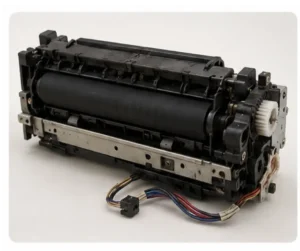
$350–$700 for the fuser plus labour. Fusers are wear items — they’re expected to be replaced at 100K–300K pages depending on the model. If your unit has put up that volume, replacement is normal service, not a sign of failure.
5 Signs It’s Time to Replace, Not Repair
- The unit is 6+ years old AND needs major service. Office printers are typically designed for a 5–7 year service life. Past that point, parts become harder to source, costs rise, and reliability drops.
- You’ve had 2+ service calls in the past year. Chronic issues across multiple systems point to broader wear that one more repair won’t solve.
- Your monthly toner cost is climbing. Older printers are dramatically less efficient than newer models. Cost-per-page on a modern multifunction can be 30–50% lower than a 6-year-old equivalent.
- Security features are outdated. Older printers often lack modern security (encrypted hard drives, secure print release, network authentication). For regulated industries — medical, legal, financial — this alone can justify replacement.
- Your needs have changed. Maybe you started with a small workgroup printer and now you need scanning, secure release, and double the speed. Don’t repair what no longer fits — upgrade to what does.
When Repair Is Almost Always Worth It
- Printer is under 4 years old
- Repair is under 30% of new equipment cost
- Single defined issue (not chronic or multi-system)
- Still under warranty or service contract
- Specialized features that would be costly to replace
Calgary Printer Repair: How Cal-Imaging Approaches Service
Cal-Imaging has been servicing office printers for Calgary businesses since 1980. Our certified technicians service every major brand we sell — HP, Canon, Samsung, Xerox, Brother, and Lexmark — and many we don’t. Most service calls are scheduled within 24 hours, and our technicians arrive with the most commonly needed parts already on the truck. For larger fleets, we offer Managed Print Services contracts that bundle service, parts, and toner into a single predictable monthly cost.
When you call us for repair, you’ll get an honest assessment: if your printer is worth fixing, we’ll fix it. If it’s reached end of useful life, we’ll tell you that too — and recommend right-sized replacement options based on your actual workload, not the highest-margin unit on the floor.
Frequently Asked Questions About Printer Repair in Calgary
How much does a printer repair service call cost in Calgary?
Most service calls in the Calgary area run $150–$300 for diagnostic and minor repairs, plus the cost of any replacement parts. Larger repairs (fuser, drum unit, transfer belt) typically range $300–$800 all-in. We provide upfront quotes whenever possible before work begins.
Can my printer be repaired on-site, or do you need to take it in?
About 85% of office printer repairs can be completed on-site at your Calgary business. Larger or more complex repairs — major board replacements, internal disassembly — are sometimes done at our service depot. We’ll always tell you upfront which is needed.
How quickly can you get a technician out?
Most service calls in Calgary are scheduled within 24 hours. Customers on Managed Print Services or Maintenance contracts get priority response — usually same-day or next-day.
Do you repair printers you didn’t sell?
Yes. We service all major brands — HP, Canon, Samsung, Xerox, Brother, Lexmark, Konica Minolta, Ricoh — regardless of where the printer was purchased. The only printers we typically don’t service are budget consumer units (Epson, Canon Pixma) where repair almost always exceeds replacement cost.
How long should an office printer last?
Office multifunction printers are designed for a 5–7 year service life under normal usage. Heavy-duty production units can last 10+ years with regular maintenance. Budget desktop printers typically last 3–5 years before repair costs exceed replacement value.
What’s the most common printer problem you see?
Paper jams and feed issues account for the majority of service calls. Almost all are caused by worn pickup rollers, dirty sensors, or paper that’s been stored in humid conditions. The repair is usually quick and inexpensive.
Should I get a maintenance contract for my printer?
If your office has more than one or two printers, or if downtime would significantly impact your business, a maintenance or Managed Print Services contract usually pays for itself. You get predictable monthly costs, priority service, and proactive monitoring that prevents many issues before they cause downtime.
Can I extend the life of my office printer?
Yes — proactive maintenance makes a big difference. Use quality paper (not bargain-basement stock), clean the rollers and feed paths quarterly, replace consumables on schedule (not after they fail), and have a technician do a preventative inspection annually. These steps routinely add 2–3 years to the useful life of an office printer.
What happens to my old printer when I replace it?
Cal-Imaging offers responsible end-of-life options for replaced equipment — secure data wiping of hard drives, certified recycling, or trade-in credit toward new equipment. Don’t put a printer in the dumpster: hard drives often contain copies of documents that have been scanned or printed.
Need Printer Repair in Calgary?
Whether your printer needs a quick fix or it’s time to talk about replacement, Cal-Imaging is ready to help. Our certified technicians service all major brands across Calgary and surrounding areas, and our team will give you an honest, transparent assessment — not just a sales pitch.
Visit us at Unit 8, 415 – 60th Avenue SE in Calgary, call (403) 252-8700, or request a service call online.