

What is a photocopier? A photocopier is a powerful office machine designed to duplicate documents quickly and efficiently, making it an essential product for businesses, schools, and organizations. From producing bulk copies of contracts and reports to creating study materials and marketing handouts, photocopier are widely used for their reliability and speed. Modern photocopier are no longer just copy machines; they combine printing, scanning, and even finishing features like stapling and duplex printing, making them a multifunctional product that supports productivity in daily operations. In this article, we will explore the definition of photocopier, their functions, and their uses.
Definition of Photocopier
A photocopier also known as a copy machine is an electronic device used to produce duplicates of documents and images quickly and efficiently. The machine works by using a combination of light, heat, and electrostatic charges to transfer toner (powdered ink) onto paper, creating an exact replica of the original.
Photocopier were first introduced in the mid-20th century and have since evolved into multifunctional devices. Modern photocopiers now integrate features such as printing, scanning, and faxing, making them indispensable in many workplaces.
Functions of Photocopier
While the primary function of a photocopier is to duplicate documents, modern machines offer a wide range of additional features. Below are the most common functions of photocopier:
1. Document Duplication
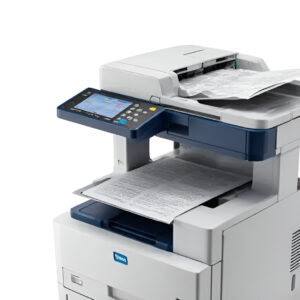
This is the main function of a photocopier. It allows users to create multiple copies of a document in seconds, saving both time and effort compared to manual duplication methods.
2. Printing
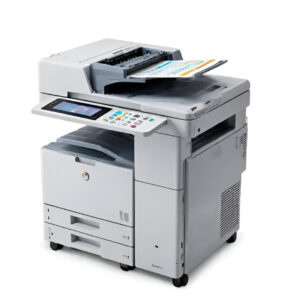
Most modern photocopier double as printers. By connecting to a computer or network, they allow users to print digital files directly onto paper.
3. Scanning
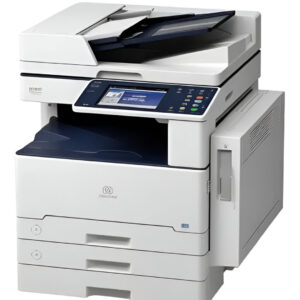
Photocopier often include scanning capabilities, enabling users to digitize physical documents and store them electronically. This is especially useful for record-keeping and sharing files via email.
4. Faxing
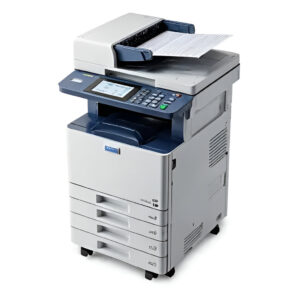
Although less common today, some photocopier still offer faxing functions, allowing documents to be transmitted securely over telephone lines.
5. Duplex Printing
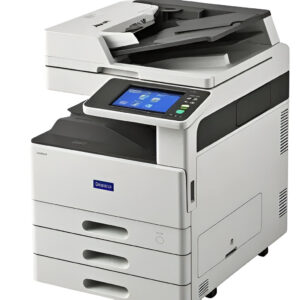
Many photocopier are equipped with duplex printing, which prints on both sides of the paper automatically. This feature reduces paper usage and supports eco-friendly practices.
6. Finishing Options
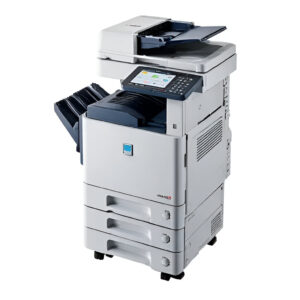
High-end photocopier include finishing features such as stapling, hole punching, or booklet creation, making them perfect for professional presentations and reports.
Uses of Photocopier
Photocopier play an important role across different industries and settings. Their versatility and efficiency make them valuable tools for a wide range of purposes.
1. Business Offices
In the corporate world, photocopier are indispensable. They are used for printing contracts, duplicating reports, and preparing training materials. Large companies often rely on high-capacity copiers to handle bulk tasks efficiently.
2. Schools and Universities
Educational institutions rely heavily on photocopier for creating handouts, exam papers, and study guides. Teachers and administrators use them daily to provide students with learning materials.
3. Government Agencies
Government offices use photocopier to duplicate important records, process forms, and distribute official documents quickly.
4. Home Offices
With remote work on the rise, many home offices now have compact photocopier. They are useful for printing assignments, scanning IDs, or managing small-scale office tasks.
5. Printing Services
Copy shops and commercial printing businesses rely on photocopier to provide services such as document duplication, binding, and customized printing for their customers.
Why Photocopier Are Still Relevant
Even in the digital age, photocopier continue to be essential. While cloud storage and email reduce the need for paper, there are still situations where hard copies are necessary such as legal documents, signed contracts, and educational materials. Additionally, modern multifunction copiers combine efficiency, connectivity, and sustainability, making them more useful than ever.
Photocopier vs. Printer vs. Multifunction Printer: What’s the Difference?
Three terms get used loosely, but they have specific technical meanings:
- Printer. A device that outputs digital files (from a computer or phone) onto paper. Standalone printers don’t copy or scan.
- Photocopier (legacy definition). A device that makes duplicates of existing paper documents. Older standalone photocopiers couldn’t print from a computer or scan to a file — they only made copies.
- Multifunction Printer (MFP). A combined device that can print, copy, scan, and (usually) fax. Virtually all office “photocopiers” sold today are technically multifunction printers — the term “photocopier” has stuck around informally to describe the larger, higher-volume units that still do the bulk of physical copying.
Practically speaking, when a Calgary business says “we need a new photocopier,” they almost always mean a multifunction office machine that copies, prints, scans, and faxes. Cal-Imaging carries a broad range of these in both colour and black-and-white configurations.
Types of Photocopiers
Colour multifunction photocopiers
Full-colour units capable of producing high-quality colour documents, marketing materials, and presentations. Modern colour MFPs use four toner cartridges (cyan, magenta, yellow, black) and offer near-photographic output quality. Best for marketing-focused businesses, real estate, design firms, and professional service businesses where document presentation matters.
Black-and-white multifunction photocopiers
Monochrome units that produce only black-and-white output. Significantly lower cost-per-page than colour units (typically $0.01–$0.02 vs $0.05–$0.10 for colour). Best for high-volume document businesses — law firms, accounting offices, government departments, and any operation producing large quantities of internal paperwork.
Production copiers
Heavy-duty, high-speed copiers built for print shops, in-house print rooms, and very-high-volume users (50,000+ pages per month). Capable of advanced finishing — booklets, saddle-stitching, folding, perforation, GBC binding. Premium feature set with corresponding price.
Wide-format copiers and plotters
Specialty units that print and copy large-format documents — engineering drawings, architectural plans, posters, banners. Common in engineering firms, architecture practices, and construction companies. Substantially different from standard office MFPs.
Specialty and desktop copiers
Smaller, lower-volume units designed for personal offices or low-page-count environments. Lower monthly capacity, lower upfront cost, lower features. Best for home offices, satellite locations, or businesses with very modest print needs.
Modern Photocopier Features to Look For
- Speed (PPM, pages per minute). Office MFPs range from 20 PPM (small workgroup) to 75+ PPM (department-level). Match to your expected daily volume.
- Paper handling. Sheet capacity, multiple input trays, paper size range (letter, legal, ledger, custom), automatic document feeder (ADF) speed.
- Duplex (two-sided) printing and copying. Standard on virtually every modern MFP; reduces paper consumption dramatically.
- Scanning destinations. Direct scan to email, network folder, cloud storage (Google Drive, OneDrive, Dropbox), or mobile devices.
- Security features. Secure print release (jobs only print when the user authenticates at the device), encrypted hard drives, user authentication, audit logging — essential for any business handling regulated data.
- Mobile printing. AirPrint, Mopria, or proprietary mobile apps — let staff print from phones and tablets without drivers.
- Finishing options. Stapling, hole punching, booklet folding, saddle-stitching for print-heavy businesses.
- Cost-per-page transparency. Especially important on leased units — know what you’re paying per page before signing.
How to Choose a Photocopier for Your Calgary Business
- Monthly page volume. The single most important number. Under 1,000 pages/month → small desktop MFP. 1,000–5,000 → workgroup MFP. 5,000–25,000 → department-level MFP. 25,000+ → production-class unit.
- Colour vs. black-and-white. If less than 10% of your volume is colour, a B&W unit with occasional colour outsourcing is usually cheaper. Above 10%, a colour MFP pays for itself.
- Lease vs. buy. Higher-volume users almost always benefit from leasing with cost-per-page billing. Low-volume users and small offices may benefit from purchasing outright. See our companion guide on Lease vs Buy for the detailed framework.
- Service and support. Service uptime matters more than spec sheets. Choose a local Calgary vendor (like us) with same-day or next-day response — a printer that’s down for a week erases any savings on the unit itself.
- Security and compliance. Medical, legal, financial, and government users need encrypted drives, secure print release, and audit logging. Don’t skip these.
Frequently Asked Questions About Photocopiers
Is a photocopier the same as a printer?
Today, almost always yes. Modern “photocopiers” in Calgary offices are multifunction printers that copy, print, scan, and fax in one unit. The two terms are used interchangeably even though they originally meant different things.
How much does a photocopier cost in Calgary?
Outright purchase: $1,500 for a basic small-office MFP up to $30,000+ for a production-class unit. Monthly lease: $50–$400+ depending on volume and features. Cost-per-page rates typically run $0.01–$0.02 black-and-white and $0.05–$0.10 colour.
How long does a photocopier last?
Office MFPs are designed for 5–7 years of service life. Heavy-duty production units can last 10+ years with regular maintenance. Smaller desktop units typically last 3–5 years.
What’s the difference between a colour and a black-and-white photocopier?
Colour MFPs use four toner cartridges to produce full-colour output; B&W units use only black toner. Colour units cost more upfront, more per page, and consume four times the toner inventory. B&W units are simpler, cheaper to run, and the right choice for businesses that rarely need colour.
Can a photocopier scan to email?
Yes — virtually every modern multifunction unit can scan directly to email, network folders, or cloud storage. Configuration is usually quick (we set this up as part of installation).
What does “cost-per-page” mean on a photocopier lease?
Cost-per-page is a billing model where you pay a fixed rate for every page produced. This usually bundles toner, maintenance, and service into one predictable number. Typical rates: $0.01–$0.02 B&W, $0.05–$0.10 colour. The advantage is predictability and no surprise toner bills.
Are photocopiers secure?
Modern MFPs can be — but only if security features are configured. Look for encrypted hard drives, secure print release (requiring user PIN or card), user authentication, and audit logging. Critical for any business handling regulated data (medical, legal, financial).
Can a photocopier print from a phone or tablet?
Yes. Modern units support AirPrint (Apple), Mopria (Android), and brand-specific mobile apps. Setup is usually under five minutes.
Where can I find a good photocopier in Calgary?
Cal-Imaging has been Calgary’s office equipment specialist since 1980, with an HP Elite Dealer status and strong partnerships across Canon, Samsung, Xerox, Brother, and Lexmark. We carry colour and black-and-white multifunction photocopiers in every size class and offer lease, purchase, and Managed Print Services packages. Visit us at Unit 8, 415 – 60th Avenue SE in Calgary, or request a quote online.
Ready to Find the Right Photocopier for Your Calgary Business?
So, when people ask what is a photocopier and why do we still use them?, the answer is simple: they are multifunctional tools that support businesses, schools, and households in countless ways. From duplicating documents to printing, scanning, and finishing, photocopier ensure smooth and efficient workflows. Despite the rise of digital tools, photocopier remain an indispensable asset in our daily lives.
For reliable office solutions, Cal-Imaging Specialist Print and IT Solutions offers high-quality photocopier and professional services to help organizations boost productivity and reduce costs. Whether you need equipment, support, or maintenance, they are your trusted partner in print and IT solutions. Call (403) 252-8700, visit our Calgary location, or request a quote online for a no-obligation recommendation.